
This is a maintenance update to fix a few bugs reported since the last update. In addition to these fixes, thumbnailing of multiple images after upload is now possible with a new simplified Create Thumbnail dialog when multiple images are selected.
Thumbnailing Multiple Images
Until now, creating thumbnails of more than one image at a time was only possible when uploading multiple images, but with this update, when multiple images are selected the Create Thumbnail button becomes available, opening a simplified dialog for creating thumbnails of the selected images. Although this dialog does not include the interactive zoom and crop tool available for a single image selection, you can set the thumbnail Dimensions and Quality, and as in the upload dialog, whether the thumbnails are created proportionately or cropped to fit the dimensions provided.
The thumbnails of all selected images can now also be deleted in a single action.

A changelog for this release is available to view here
Thank you to everyone who submitted bug reports and tested development versions. If you find any more issues please submit them on the forum or on github.
Download and Installation
JCE Pro is available for download with a JCE Pro Subscription.
If you already have a subscription, please make sure you set your key before updating
Instructions for installing and updating JCE for each Joomla version are available here
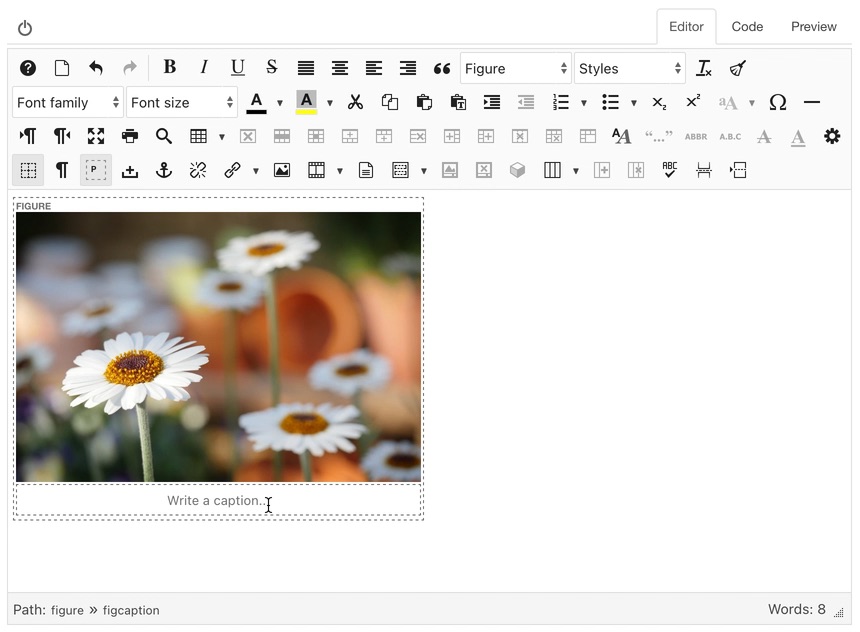
This is a maintenance update to fix a number of bugs reported since the last update, and adds improvments to the handling of the <figure> and <figcaption> tags as an alternative method for creating image captions.
Figure and FigCaption improvements
The <figure> and <figcaption> tags provided a way for content creators to display captions on images and other media, and has been available as an alternative caption option in JCE by applying the Figure option from the Format list to a selected image. Doing so would wrap the image in a <figure> tag, with an associated <figcaption> tag for the image caption. This caption content was limited to single line text (although some formatting, like bold, underline, classes etc, could be applied), but this has now been improved to allow for block level formatting, eg: Heading1, Heading2, Paragraph etc. and multi-line text.
The <figure> and <figcaption> tags can be removed from the image by toggling the Figure option again in the Format list.
Astroid Template Framework support
Support has been added for the JoomDev Astroid Template Framework, for editor content styling.
A changelog for this release is available to view here
Thank you to everyone who submitted bug reports and tested development versions. If you find any more issues please submit them on the forum or on github.
Download and Installation
JCE Pro is available for download with a JCE Pro Subscription.
If you already have a subscription, please make sure you set your key before updating
Instructions for installing and updating JCE for each Joomla version are available here
This is a maintenance update to fix a number of bugs reported since the release of 2.9.4, and a to add 2 small improvements.
Column drag selection
You can now drag select across columns, to delete content or apply formatting, as with table cells.

JoomlArt T4 Framework support
The T4 Template Framework, used by JoomlArt templates, generates a compiled css file when changes are made to template options. As with other template frameworks, the editor will now use the latest available compiled css file to style the editor content, for a closer match to front-end styling.
A changelog for this release is available to view here
Thank you to everyone who submitted bug reports and tested development versions. If you find any more issues please submit them on the forum or on github.
Download and Installation
JCE Pro is available for download with a JCE Pro Subscription.
If you already have a subscription, please make sure you set your key before updating
Instructions for installing and updating JCE for each Joomla version are available here
This is a maintenance update to fix a number of bugs reported since the last release. A couple of small improvments have also been added:
- Blockquote formatting in Word documents will now be converted to
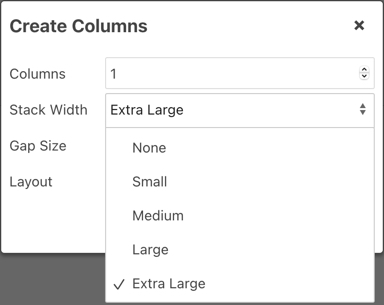
<blockquote>tags when pasted into the editor. - The Columns tools now include an Extra Large option for the Stack Width.
- The Basic Dialog in the Image Manager and Media Manager now includes an upload button to directly upload and select an image or video. Drag & drop upload is also supported, by dropping an image or video onto the URL field.

A changelog for this release is available to view here
Thank you to everyone who submitted bug reports and tested development versions. If you find any more issues please submit them on the forum or on github.
Download and Installation
JCE Pro is available for download with a JCE Pro Subscription.
If you already have a subscription, please make sure you set your key before updating
Instructions for installing and updating JCE for each Joomla version are available here
This update fixes a number of bugs reported since the last release, and adds a few new features and improvements, including:
- The JCE File Browser is now available in "Repeatable" or "Sub Form" Media Fields. This does not include the ability to drag & drop upload into the media field itself, as is possible with non-repetable media fields.
- It is now possible to re-apply the last action to a new selection using the CTRL + ALT + Z keyboard shortcut. For example, if you apply a style from the Styles list to a selection, you can then make a new selection and re-apply the style using the keyboard shortcut, without having to re-select the style from the Styles list.
A changelog for this release is available to view here
Thank you to everyone who submitted bug reports and tested development versions. If you find any more issues please submit them on the forum or on github.
Download and Installation
JCE Pro is available for download with a JCE Pro Subscription.
If you already have a subscription, please make sure you set your key before updating
Instructions for installing and updating JCE for each Joomla version are available here