
Since the last 2 updates JCE does not handle my user.css. As a result in the editor everything looks very different then it looks at the site for real. Until resently this function worked well. Not anymore and that's a big annoyance.
Sorry for my English
#99348 User.css not longer active in jce!
Posted in ‘Editor’
This is a public ticket
Everybody will be able to see its contents. Do not include usernames, passwords or any other sensitive information.
Latest post by Ryan on Tuesday, 16 April 2019 10:22 BST
Saturday, 13 April 2019 08:23 BST

Ryan
By "user.css" I assume you are referring to a custom css file that the editor is configured to load?
What have you set for Editor Styles and Custom CSS Styles in the Editor Global Configuration?
Ryan Demmer
Lead Developer / CEO / CTO
Just because you're not paranoid doesn't mean everybody isn't out to get you.
Saturday, 13 April 2019 09:20 BST

Koos
Thanks for responding Ryan.
I had custom css styles and the address for the user.css first.
Now I have the template style chosen.
Both work fine. But what I need and what worked in the past was using the template (protostar) and the user.css together as it does at the front side of the site.
Saturday, 13 April 2019 09:27 BST
Ryan
But what I need and what worked in the past was using the template (protostar) and the user.css together as it does at the front side of the site.Create a file called editor.css in your template's css folder, and add:
@import url('template.css');
@import url('user.css');
Ryan Demmer
Lead Developer / CEO / CTO
Just because you're not paranoid doesn't mean everybody isn't out to get you.
Saturday, 13 April 2019 09:54 BST
Koos
pity, I did exactly what you prescribed, checked and double checked, but do not work so far.
Attachments
Saturday, 13 April 2019 11:04 BST
Ryan
Please send me a login - https://www.joomlacontenteditor.net/contact/site-login
Ryan Demmer
Lead Developer / CEO / CTO
Just because you're not paranoid doesn't mean everybody isn't out to get you.
Saturday, 13 April 2019 11:44 BST
Koos
Sorry Ryan, unfortunately that's against company policy. In the past doing this caused u big trouble. That's where the policy comes from.
But,
I am happy to provide you with all information you like to see.
Then let me be your pair of hands and I do the trials and suggestions that pops up in your mind.
Could work that way, I did it before :-)
Thank you for your support,
Koos
Sunday, 14 April 2019 11:26 BST
Koos
installed 2.7.9 and 2.7.10.
Unfortunately the issue is still not resolved. Could we work together on this?
You may mail me directly if you prefer.
Thanks, Koos
Monday, 15 April 2019 19:09 BST
Ryan
Are the styles from the template.css file showing correctly in the editor?
Is the Styles list populated with items?
Ryan Demmer
Lead Developer / CEO / CTO
Just because you're not paranoid doesn't mean everybody isn't out to get you.
Monday, 15 April 2019 23:55 BST
Koos
Not sure about what you mean bye that Ryan. It helps if you show a picture of what you want to see.
Attached two pictures of what I see about styles
Regards, Koos[list]
[*]
[/list]
Attachments
Tuesday, 16 April 2019 09:22 BST
Ryan
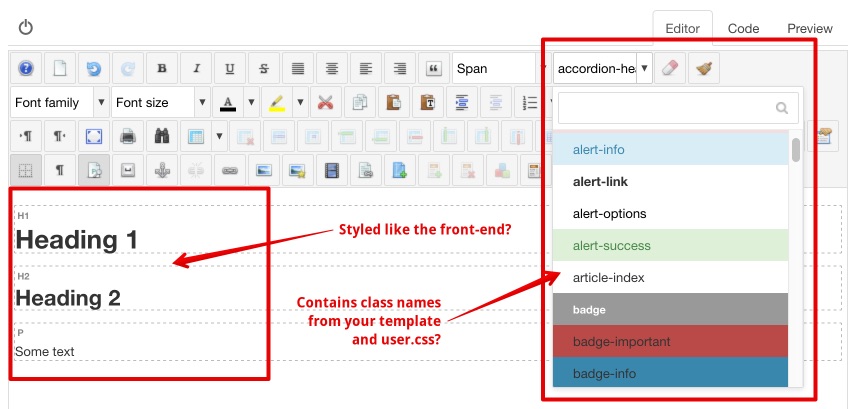
Does text in the editor window look like the text in the front-end?
Is the Styles list filled with items, with names from classes in your template.css file and user.css file?
Ryan Demmer
Lead Developer / CEO / CTO
Just because you're not paranoid doesn't mean everybody isn't out to get you.
Tuesday, 16 April 2019 10:12 BST
Koos
Thank you Rian, no this information I've never seen
Tuesday, 16 April 2019 10:22 BST
Ryan
In the Editor Global Configuration, make sure Compress CSS and Compress Javascript are set to No.
What does your user.css file contain?
Ryan Demmer
Lead Developer / CEO / CTO
Just because you're not paranoid doesn't mean everybody isn't out to get you.